How to Check the Balance Sheet
Core PathWay1 🎯 Purpose & What 'Good' Looks Like
When you check a balance sheet, you look at the company’s money and the things it owns. You want to see if the numbers are correct and if everything adds up. Good checking means you find any mistakes and ask questions about strange figures. You use a neutral and polite tone in meetings and emails. You compare this month with last month. You notice if assets went up or liabilities went down. You report what you find to your manager or team.
Quick openers you can use:
“I checked the balance sheet and I have some questions.”
“Can we look at these numbers together?”
💬 Dialogue 1: Checking Together
Two colleagues check a balance sheet at their desks
2 🧭 Move Map (Step-by-Step Strategy)
Step 1: Open the balance sheet
Purpose: Start your work and see the document.
“I will look at the balance sheet now.”
“Let me open this month’s report.”
Step 2: Check the totals
Purpose: See if assets equal liabilities plus owner money.
“First, I need to check if the totals match.”
“Do these figures add up correctly?”
Step 3: Compare with last month
Purpose: Find any big differences or changes.
“I will compare this month with last month.”
“I can see an increase in cash here.”
Step 4: Look for mistakes
Purpose: Find errors in numbers or missing information.
“I notice this number looks wrong.”
“There is a difference in this line.”
Step 5: Ask questions
Purpose: Clarify things you don’t understand.
“Can you clarify this figure for me?”
“I have a question about this section.”
Step 6: Report your findings
Purpose: Tell your team what you found.
“I checked everything and found two mistakes.”
“The balance sheet is correct now.”
💬 Dialogue 2: Asking About an Error
A team member asks a polite question in a meeting
3 💬 Phrasebank by Function (Grouped Starters)
Opening the task:
“I will check the balance sheet today.”
“Let me look at these numbers.”
“I need to see the report first.”
Checking totals:
“The totals match on the left side and right side.”
“These figures add up correctly.”
“The assets equal the liabilities plus owner money.”
“This number doesn’t add up.”
Comparing periods:
“Last month, cash was lower.”
“I can see an increase in equipment.”
“There is a decrease in debt this month.”
“Let me compare the two months.”
Finding problems (neutral):
“I notice a difference here.”
“This figure looks strange.”
“I find a mistake in this row.”
Finding problems (polite):
“Can we check this number together?”
“I think there is an error in this column.”
“Maybe this line is wrong?”
Asking for clarification:
“Can you clarify this for me?”
“I have a question about this section.”
“What does this figure show?”
“Can you confirm this number?”
Reporting findings:
“I checked the balance sheet and everything is correct.”
“I found two mistakes in the bottom section.”
“The report is ready now.”
“All the numbers match.”
💬 Dialogue 3: Reporting to Manager
Employee reports findings after checking the balance sheet
4 📨 Micro-Templates (Email/Chat)
EMAIL TEMPLATE:
Subject: Balance Sheet Check – [Month]
Hi [Name],
I checked the balance sheet for [month]. The totals add up correctly. I compared it with last month and I notice an increase in cash. There is one question – can you clarify the figure in the equipment line? It shows [number] but I think it was [number] before.
Please confirm when you can.
Thanks,
[Your name]
—
CHAT TEMPLATE:
Hi! I looked at the balance sheet. Quick question – the debt number in row 5 doesn’t match last month. Can we check this together? I find a difference of [amount]. Let me know! 👍
💬 Dialogue 4: Explaining the Balance Sheet
An experienced worker explains a balance sheet to a new colleague
5 🎭 Micro-Dialogues in Action
Dialogue 1: Neutral check-in (at desk)
Sarah: I will check the balance sheet now.
Tom: Good. Look at the totals first.
Sarah: OK. The assets equal the liabilities. That’s correct.
Tom: Great. Compare it with last month too.
Sarah: I can see an increase in cash.
Tom: Yes, that’s right. Any mistakes?
Sarah: No, everything adds up.
—
Dialogue 2: Polite question (in meeting)
Lisa: I checked the numbers and I have a question.
Mark: Sure, what is it?
Lisa: Can you clarify this figure in the equipment section?
Mark: Which line?
Lisa: The bottom line. It shows 5,000 but I think it was 3,000 last month.
Mark: Let me look at that. You’re right – there’s an error. Thanks for finding it!
—
Dialogue 3: Reporting findings (to manager)
Sarah: I finished checking the balance sheet.
Tom: How does it look?
Sarah: I found one mistake in the debt column.
Tom: What’s the difference?
Sarah: The number should be 2,000, not 2,200.
Tom: Can you correct it?
Sarah: Yes, I will fix it now.
Tom: Good work. Confirm when it’s ready.
💬 Dialogue 5: Monthly Review
Two colleagues compare balance sheets from different months
6 ⚠️ Pitfalls → Fixes → Best
Pitfall 1: Too direct/unclear
❌ Bad: “This is wrong.”
Pitfall 2: No comparison
❌ Bad: “The cash is 5,000.”
Pitfall 3: Missing question/clarification
❌ Bad: “This number looks strange.”
Pitfall 4: Vague reporting
❌ Bad: “I looked at it.”
Pitfall 5: Wrong verb choice
❌ Bad: “I saw the balance sheet.” (= you just looked)
Key grammar patterns:
– Use present simple for routines: “I check the balance sheet every month.”
– Use can for polite requests: “Can you clarify this?”
– Use comparatives for differences: “The cash is higher this month.”
– Use imperatives for instructions: “Check the totals first.”
Member-Exclusive Vocabulary Review & Acquisition System
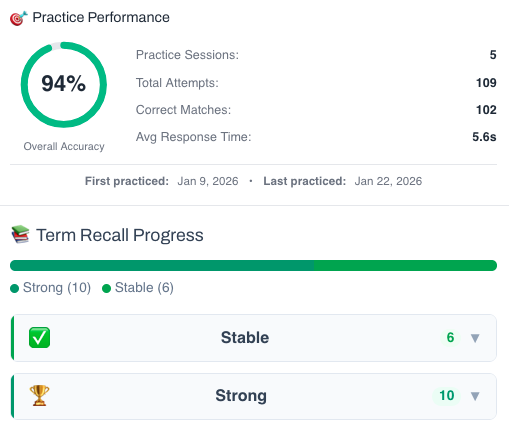
This isn’t a simple quiz — it’s a fully tracked learning system. You build knowledge through recognition, then recall, and your progress feeds directly into the Integrated Practice Bar (Writing tasks, AI Chat, and more).
- Practice sessions, accuracy, and response-time tracking
- Term strength levels (Learning → Stable → Strong)
- Personal progress history for each unit
This feature is available to YSP members.
Explore Membership BenefitsMember-Exclusive Practice Bar
Access a wide range of integrated practice for this unit — from Vocabulary and Grammar activities to AI-curated Writing tasks and Thematic Chat practice.
This feature is available to YSP members.
Explore Membership Benefits