How to Check the Profit and Loss Account
Core PathWay1 🎯 Purpose & What 'Good' Looks Like
The goal is to check the profit and loss account correctly. You look at all the numbers. You find the revenue and the expenses. You check if the total is correct. You compare the numbers with last year. Good checking means you find mistakes. You understand what the numbers mean. You can explain the profit or loss.
Two quick openers:
“Can I check the profit and loss account?”
“I want to look at the revenue numbers.”
💬 Dialogue 1: Checking the Account Together
Alex and Sam sit at a desk and check the profit and loss account together
2 🧭 Move Map (Step-by-Step Strategy)
Step 1: Start with the top line
You check the gross revenue first. This is also called gross sales or the top line.
“Let me start with the gross revenue.”
“I will check the top line first.”
Step 2: Check the cost of sales
You look at the cost of goods sold (also called cost of sales). This includes raw materials and labor.
“What is the cost of goods sold?”
“I need to see the labor costs.”
Step 3: Calculate net revenue
You subtract the cost of sales from gross revenue. This gives you net revenue.
“I will calculate the net revenue now.”
“Can you help me subtract these numbers?”
Step 4: Review operating expenses
You check all opex (operating expenses). This includes salaries, wages, utilities, overhead, depreciation, amortization, and R&D.
“Let me review the operating expenses.”
“Are the salaries correct here?”
Step 5: Compare with last period
You compare the numbers with last year or last month. You look for big changes.
“I want to compare this with last year.”
“Did the expenses increase or decrease?”
Step 6: Check for mistakes
You look for wrong numbers. You ask questions if something looks strange.
“This number looks wrong.”
“Can you check this amount again?”
💬 Dialogue 2: Finding and Fixing a Mistake
Jordan finds a mistake in the salaries section and asks Chris to fix it
3 💬 Phrasebank by Function
Opening the check
– “I need to check the profit and loss account.”
– “Can I see the revenue report?”
– “Let me look at the numbers.”
Asking about revenue
– “What is the gross revenue this month?”
– “Can you show me the top line?”
– “How much is the net revenue?”
Asking about costs
– “What is the cost of goods sold?”
– “How much did we spend on raw materials?”
– “Can I see the labor costs?”
Asking about expenses
– “What are the total operating expenses?”
– “How much are the salaries this month?”
– “What did we pay for utilities?”
– “Can you explain the depreciation amount?”
– “What is the R&D budget?”
Comparing numbers
– “This is higher than last year.”
– “The costs increased a lot.”
– “Revenue decreased this month.”
– “Let me compare these two numbers.”
Finding problems
– “This number looks wrong.”
– “I think there is a mistake here.”
– “Can you check this amount again?”
– “The total is not correct.”
Closing
– “The account looks correct now.”
– “Thank you for helping me check.”
– “I will send you my notes.”
💬 Dialogue 3: Comparing with Last Year
Alex and Sam discuss why overhead costs increased compared to last year
4 📨 Micro-Templates (Email/Chat)
Template 1: Email to manager
Subject: Profit and Loss Account Check – [Month]
Hi [Name],
I checked the profit and loss account for [month]. The gross revenue is [amount]. The cost of sales is [amount]. The net revenue is [amount].
The operating expenses are [amount]. This includes salaries, utilities, and overhead.
I found one problem: [describe issue]. Can you help me fix this?
The total profit is [amount].
Thank you,
[Your name]
—
Template 2: Chat message to colleague
Hi [Name], can you help me? I am checking the P&L account. The labor costs look very high this month. Last month they were [amount]. This month they are [amount]. Is this correct? Also, what is the depreciation amount for [equipment]? Thanks!
💬 Dialogue 4: Understanding the Top Line
Taylor is new and asks Morgan to explain what the top line means
5 🎭 Micro-Dialogues in Action
Dialogue 1: Checking with a colleague (neutral)
Alex: Hi Sam. Can I check the profit and loss account with you?
Sam: Yes, of course. What do you need?
Alex: I want to start with the top line. What is the gross revenue?
Sam: It is 50,000 this month.
Alex: OK. And what is the cost of goods sold?
Sam: The cost of sales is 20,000. This includes raw materials and labor.
Alex: So the net revenue is 30,000. Is that correct?
Sam: Yes, that is correct.
—
Dialogue 2: Finding a problem (polite)
Jordan: Excuse me, Chris. I am checking the operating expenses.
Chris: Yes, what do you need to know?
Jordan: The salaries amount looks wrong. It says 15,000 here.
Chris: Let me see. Oh, you are right. It should be 12,000.
Jordan: Can you change it, please?
Chris: Yes, I will fix it now. Thank you for finding that.
—
Dialogue 3: Comparing with last year (firm)
Alex: I need to talk about the overhead costs.
Sam: What is the problem?
Alex: They increased a lot. Last year they were 5,000. This year they are 8,000.
Sam: Yes, utilities went up. And we spent more on R&D.
Alex: We need to check all these numbers carefully.
Sam: I agree. Let me get the full report.
💬 Dialogue 5: Calculating Net Revenue
Pat and Kim work together to calculate the net revenue from the gross revenue and cost of sales
6 ⚠️ Pitfalls → Fixes → Best
Problem 1: Too direct
❌ Bad: “This is wrong.”
Problem 2: Not clear what you want
❌ Bad: “Can you help me?”
Problem 3: Wrong verb
❌ Bad: “I want to do the numbers.”
Problem 4: Missing the time
❌ Bad: “The costs increased.”
Problem 5: Not polite enough
❌ Bad: “Show me the report.”
Grammar tip: Use can to ask polite questions. Use is/are to check facts. Use was/were to compare with the past.
Collocation tip: We say check the account, not ‘see the account’. We say cost of goods sold, not ‘cost of goods’. We say operating expenses, not ‘operation expenses’.
💬 Dialogue 6: Reviewing Operating Expenses
Riley asks Casey to review all the operating expenses and explain what each item means
Member-Exclusive Vocabulary Review & Acquisition System
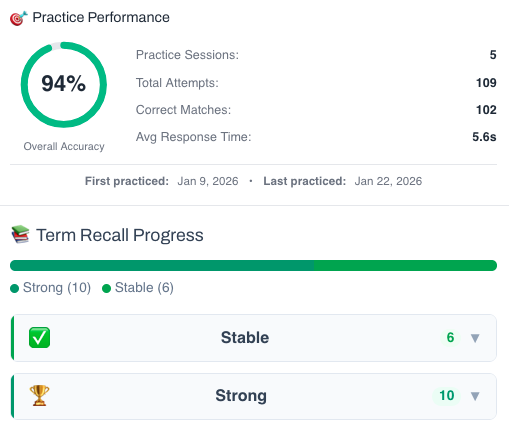
This isn’t a simple quiz — it’s a fully tracked learning system. You build knowledge through recognition, then recall, and your progress feeds directly into the Integrated Practice Bar (Writing tasks, AI Chat, and more).
- Practice sessions, accuracy, and response-time tracking
- Term strength levels (Learning → Stable → Strong)
- Personal progress history for each unit
This feature is available to YSP members.
Explore Membership BenefitsMember-Exclusive Practice Bar
Access a wide range of integrated practice for this unit — from Vocabulary and Grammar activities to AI-curated Writing tasks and Thematic Chat practice.
This feature is available to YSP members.
Explore Membership Benefits