Items in My Office: The Essential Vocabulary Guide
Core PathWay1 Section 1. Your Office Has Its Own Language — Let's Learn It
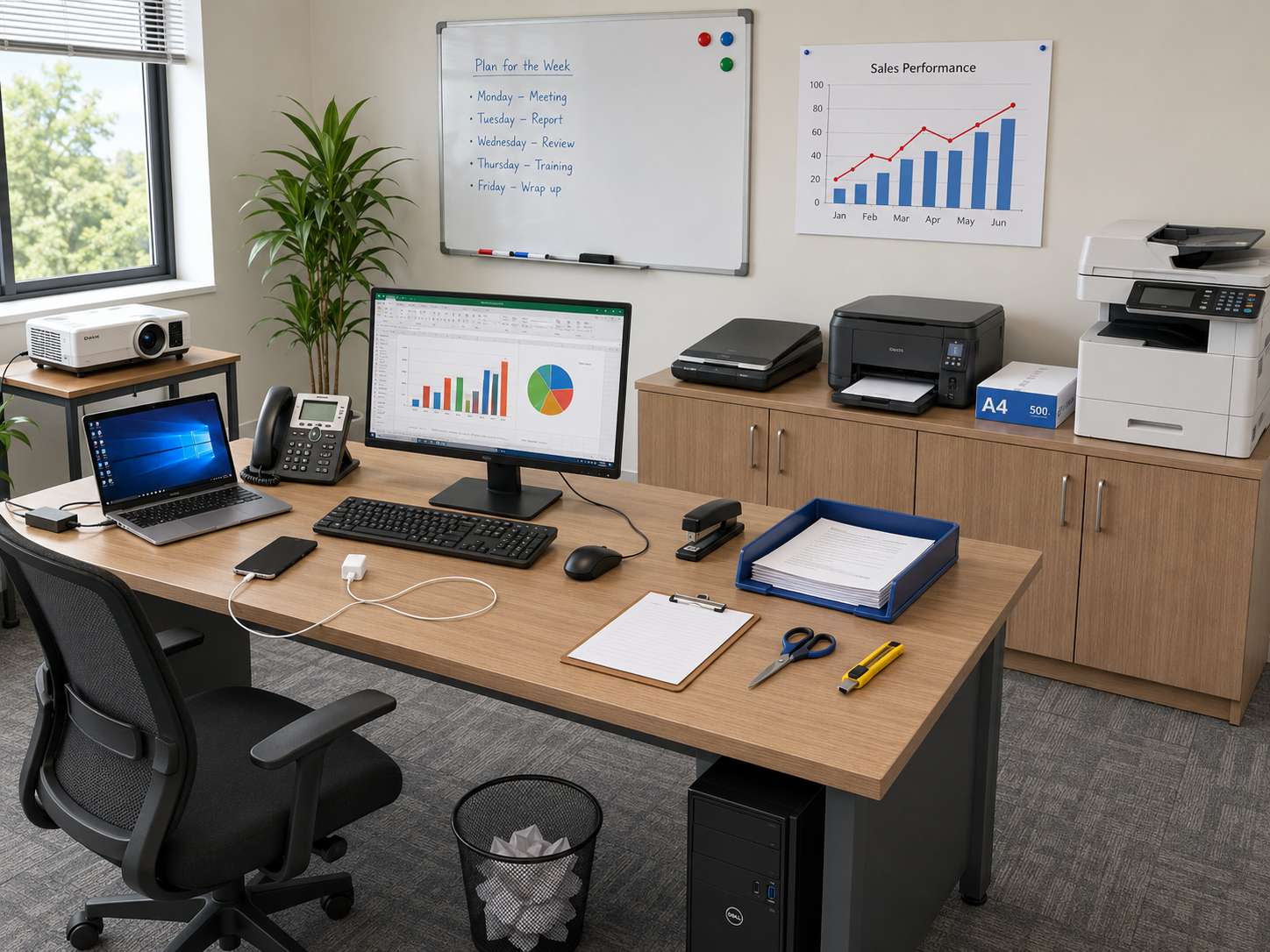
Want to talk confidently about the items in your office? It starts with these words. Every office has a computer setup. The most common type is a laptop. A laptop runs on battery or AC power, so you can use it at your desk or take it to a meeting. Many offices also use a tower pc. A tower pc is a vertical computer case that contains the CPU, motherboard, and drives — it stays on your desk and connects to a separate screen. That screen is called a screen, and it shows text, images, and video from a PC. To type on your computer, you use a keyboard. A keyboard is essential for typing and shortcuts. To move the cursor around the screen, you use a mouse. A mouse enables GUI navigation and clicking. Together, the keyboard and mouse are the two main tools you use to control your computer.
2 Section 2. Printing, Scanning, and Copying
Once you have your computer set up, you often need to work with paper documents too. A printer is a device that puts text or graphics onto paper. It outputs hard copies from digital files — so when you finish a report on your laptop, the printer makes a paper version for you. If you need many copies of the same document quickly, you use a photocopier. A photocopier makes duplicate copies by a process called xerography. To go the other way — from paper to digital — you use a scanner. A scanner digitizes paper documents or photos and creates electronic image or PDF files. Paper itself is stored in a ream of paper. A ream of paper is a pack of 500 uniform sheets. It is the standard supply you load into a printer or photocopier. These three machines — the printer, the photocopier, and the scanner — are the paper-handling team of any office.
3 Section 3. Presenting and Displaying Information
Offices are places where people share ideas, and some items help you do that visually. A projector is a device that beams video or slides onto a large surface. It is used for presentations and meetings, so everyone in the room can see the same image at the same time. A whiteboard is a writeable glossy board for dry-erase markers. You can write on it, erase it, and write again — it is great for brainstorming and notes during a team meeting. A chart is a large visual display with data or graphics. Charts are used for reference or presentations, and you might pin one to the wall so your team can check information easily. Think of the projector as the high-tech option, the whiteboard as the quick and flexible option, and the chart as the ready-made reference option. Each one has a different job in helping people communicate clearly.
4 Section 4. Your Desk and Chair — The Foundation of Your Workspace
Before you think about technology, you need somewhere to sit and work. An office-desk is a work table with a flat surface for computers and papers. It often includes drawers or cable management to keep things organised. The place where you sit is your office-chair. An office-chair is an adjustable seat for sitting at a desk. It supports your posture with wheels and armrests, so you can stay comfortable during a long working day. On your desk, you will often find an in-tray. An in-tray is a tray or basket for incoming documents. It holds pending mail or tasks that you still need to process. Near your desk, there is usually a wastepaper bin. A wastepaper bin is a container for discarded paper and trash. It keeps the floor tidy. A good desk, a good chair, a clear in-tray, and a nearby wastepaper bin — these four items create a workspace that is ready for anything.
5 Section 5. Phones, Chargers, and Staying Connected
Communication is a big part of office life, and offices use more than one type of phone. A desktop/fixed line phone is a telephone connected by cable to a wall jack. It is used for voice calls in an office and is always in the same place on your desk. A mobile phone is a portable cellular device for calls and apps. It works wirelessly over cellular networks, so you can use it anywhere. Both phones need power to work. A laptop charger is a power adapter that supplies DC voltage to a laptop. It recharges the battery and runs the laptop. A phone charger is an adapter and cable that recharges a phone battery. It connects to a USB port or a wall outlet. It is a good idea to keep your chargers organised at your desk so your devices are always ready to use.
6 Section 6. Stationery and Small Tools That Get the Job Done
Some of the most useful items in an office are small and easy to overlook. A stapler is a device that drives metal staples into paper. It binds sheets together permanently, which is useful when you have a multi-page report. A clipboard is a rigid board with a spring clip to hold papers. It provides a portable writing surface, so you can write notes even when you are away from your desk. Scissors are a two-bladed cutting tool with finger loops. They cut paper, tape, and thin materials quickly and cleanly. A box-cutter is a retractable-blade knife for opening cartons. It slices through cardboard and tape safely, which makes it very useful when office supplies arrive in boxes. Finally, a projector needs a surface to work with, and that is often where a ream of paper is nearby for printed handouts too. These small tools work quietly in the background, but without them, the office would quickly stop running smoothly.
Member-Exclusive Practice Bar
Access a wide range of integrated practice for this unit — from Vocabulary and Grammar activities to AI-curated Writing tasks and Thematic Chat practice.
This feature is available to YSP members.
Explore Membership BenefitsMember-Exclusive Vocabulary Review & Acquisition System
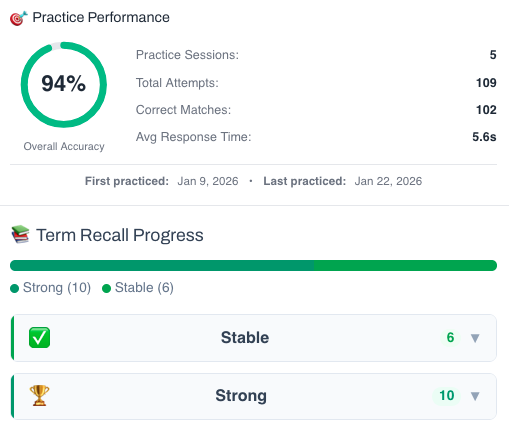
This isn’t a simple quiz — it’s a fully tracked learning system. You build knowledge through recognition, then recall, and your progress feeds directly into the Integrated Practice Bar (Writing tasks, AI Chat, and more).
- Practice sessions, accuracy, and response-time tracking
- Term strength levels (Learning → Stable → Strong)
- Personal progress history for each unit
This feature is available to YSP members.
Explore Membership Benefits
🎮 Practice Games
Sentence Scrambler
Items in my Office – Sentence Scramble
Member-Exclusive Sentence Builder
Reconstruct scrambled sentences to practice word order and develop your grammar intuition.
This feature is available to YSP members.
Explore Membership Benefits