Managing Paperwork and Files at Work
Core PathWay
1 Starting Your Admin Tasks
You have chosen to learn about paperwork, admin and files, so let’s get started. Every office worker needs to do the paperwork every day. This means you fill in forms with information about customers or projects. You also handle the admin for your team. Admin means all the small office jobs you must do. When you start work, you collect information from emails and meetings. Then you can begin your tasks.
2 Working with Documents
You need to check the documents before you use them. Look at each paper carefully to find mistakes. You must verify details like names, dates, and numbers. This means you check if the information is correct. After that, you sign forms with your name. Many offices ask you to scan documents with a machine. The machine makes digital copies of the papers.
3 Organizing Your Files
Good workers organize files every week. You sort paperwork into different groups. Put all the same papers together. Then you file documents in the correct folders. Each folder has a label with a name. When you finish, you complete the files so everything is ready. You also attach files to emails when you send them to colleagues.
4 Submitting and Processing Work
After you finish your work, you submit paperwork to your manager. You give the completed documents to the right person. Your manager will review documents again to check everything. Managers also process applications from customers or new workers. They read each request carefully and make decisions. You must prepare reports with important information for meetings.
5 Keeping Records and Storing Files
Every company must keep records of important information. You store papers and files for the future. You update files when you get new information about a project. Add the new details to the correct folder. When files are very old, you archive files in a safe place. Old documents go into special storage boxes or computer folders.
Use the VAS to build solid recognition and recall of the terms below.
✔ Every correct Match = +1 point
✔ Every correct Recall = +2 points
🎓 Reach 5 points with good accuracy and the term is automatically promoted to your Personal Dictionary.
Incorrect answers lower accuracy, meaning more correct Matches or Recalls may be needed to reach promotion.
Member-Exclusive Vocabulary Review & Acquisition System
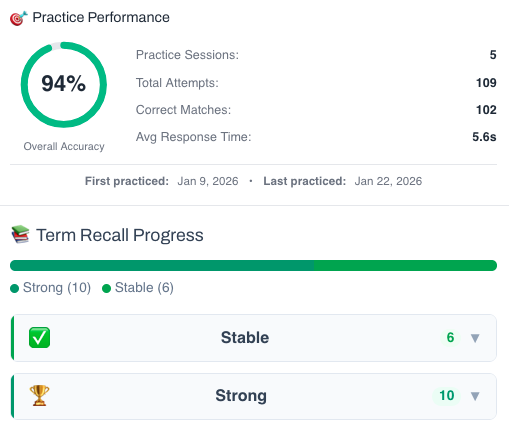
This isn’t a simple quiz — it’s a fully tracked learning system. You build knowledge through recognition, then recall, and your progress feeds directly into the Integrated Practice Bar (Writing tasks, AI Chat, and more).
- Practice sessions, accuracy, and response-time tracking
- Term strength levels (Learning → Stable → Strong)
- Personal progress history for each unit
This feature is available to YSP members.
Explore Membership BenefitsMember-Exclusive Sentence Builder
Reconstruct scrambled sentences to practice word order and develop your grammar intuition.
This feature is available to YSP members.
Explore Membership Benefits